Players

Three ways to experience
your folio.

RAGMI is built to be experienced, not just archived. Once your folio exists, it can be consumed in three distinct ways — each designed for a different context, a different person, a different kind of attention.

RAGMI // Human RAG in action
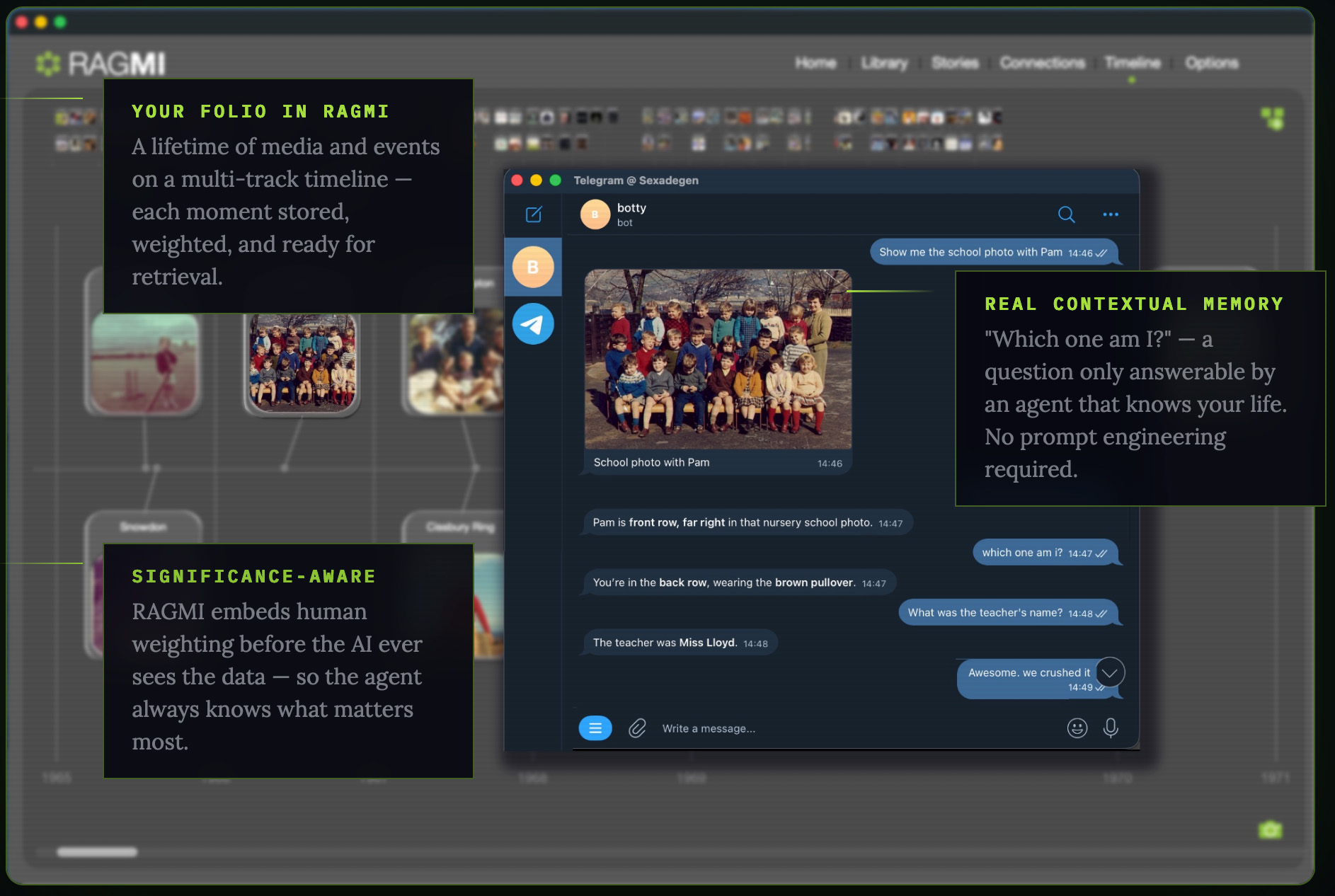
RAGMI OpenClaw agent identifying people in a childhood school photo using folio context
Human Context Layer Active OpenClaw agent →
Mac Player Mode iOS Player OpenClaw Agent
01
Available now · RAGMI for Mac

Mac Player Mode.
Your folio, beautifully read.

Building a folio and experiencing one are two different things. Player Mode switches RAGMI from editing to presentation — a clean, distraction-free view of your life story as a reader would encounter it.

Scroll through the timeline without the editing interface in the way. Read stories in their full form, with their images and attachments. Play back your audio commentary. Navigate connections and see how the people in your life relate to the events on your timeline.

It is the same folio. A completely different way of being inside it. Useful for reviewing what you've built, for showing someone your folio in person, and for experiencing the whole of it as a coherent story rather than a project under construction.

Mac Player Mode · What you can do
01
Full timeline in presentation mode

Multi-track timeline rendered without editing controls — the full chronological architecture of your folio, scrollable and browsable.

02
Stories in read mode

Each story opens in its final form — full narrative text, images, attachments. The writing without the editor.

03
Audio commentary playback

Any story, connection, album, or song with attached audio plays back in context. Hear yourself telling the stories as you review them.

04
Connections in portrait view

The people in your folio, laid out as a network. Click any connection to read their profile, their bonds, their role in your story.

05
Soundtrack playback

Albums and songs play with their stories visible. The music and the meaning, together.

Included with RAGMI for Mac

Player Mode is part of RAGMI for Mac — no additional purchase required. Toggle between edit and player from anywhere in the interface.

Available · iOS App Store · Free
Platform iOS · Free download
Primary user Family members, friends, and named recipients
Function Read-only folio experience — browse, play, explore
Folio source Published .ragmi file from RAGMI for Mac
Access control Universal, or restricted to named recipients via Sign In with Apple
Audio Supports voice commentary on stories, connections, albums & songs
Timeline Multi-track, horizontally and vertically scrollable
Connections Portrait network with profile view
Soundtrack Album playback with attached story & commentary

How sharing works

In RAGMI for Mac, use Publish to generate a .ragmi file. Share it with anyone — or lock it to specific Apple IDs using Sign In with Apple, so only the people you've named can open it. The Player imports the file and presents the folio in read-only form.

02
Available now · iOS · Free

RAGMI Player.
Your family's window.

The Mac application is for building. The iOS Player is for experiencing. A beautiful, free iOS app that lets your family — your children, your grandchildren, people who may never have known you when you were young — walk through your folio at their own pace.

Publish a folio from RAGMI for Mac and share the .ragmi file however you like — by email, AirDrop, iCloud. They open it in the Player and encounter your life: the timeline, the connections, the stories, the soundtrack.

Choose who can open it. A publicly published folio can be opened by anyone. A privately published folio is locked to specific Apple IDs — Sign In with Apple ensures that only the people you've named can access it. Secure sharing with family and close friends, built into the file itself.

And if you've recorded audio commentary against any story, connection, album, or song, the Player will play it back. Hear the voice of the person who built the folio, telling their own stories. That's what this is all for.

Download RAGMI Player — Free →
03
Available now via OpenClaw

OpenClaw Agent.
Human RAG.

Your folio is not just an archive — it is a context layer. Load your RAGMI export into OpenClaw and your AI agent stops being a capable stranger. It knows your timeline. It knows who your friends and family are, and the important, weighted details of your life.

This is Human RAG — Retrieval Augmented Generation applied to a human life. The agent queries your folio in real time, retrieving the relevant memory, relationship, or event to answer questions that no general-purpose AI could touch. Not because it was trained on your data. Because your folio was structured so it could reason with it.

The screenshot at the top of this page is real. An agent connected to a RAGMI folio via OpenClaw — identifying a person in a childhood photograph, giving their position in the class photo, naming the teacher. No prompt engineering. No system instructions. Just a folio and an agent that knows how to use it.

Learn about OpenClaw → See the tutorials
How it works · OpenClaw integration
Step 1 Build your folio in RAGMI for Mac — timeline, connections, stories, significance
Step 2 Use HCP Export to generate your Human Context Protocol package — dual-layer JSON-LD and Semantic Markdown
Step 3 Run the bridge script — ragmi_openclaw.py — which feeds your folio to OpenClaw as a live RAG knowledge layer
Step 4 Your OpenClaw agent now knows your life. Ask it anything — people, places, dates, relationships, what things meant to you
No training No fine-tuning, no model uploads. The HCP structure does the work. The agent retrieves in real time.

Why the structure matters

Most AI context is flat text — a document the model reads once and partially retains. HCP is different. Every person, event, relationship, and memory is structured with semantic metadata: who was involved, when, what it meant, how significant it was. The agent doesn't search your life story like a document. It reasons across a structured knowledge graph.

That's why it can answer questions a general-purpose AI never could — not because it was trained on you, but because your folio was built so a machine could think with it.

OpenClaw Bridge Script

ragmi_openclaw.py

Python bridge connecting your RAGMI HCP export to an OpenClaw agent. Reads your folio config, presents a native folder picker on first run, and wires the knowledge layer in.

↓ Download Script

The folio comes first.
Then everything else.

All three players depend on a folio worth experiencing. Download RAGMI for Mac and start building yours.

Download for Mac RAGMI Player — Free →